View Charts
Compare Charts Tool
Sign up for spot price alerts
Free! Sign up for email and/or SMS Spot Price Alerts
Evaluate Market Symbols with Compare Charts Tool
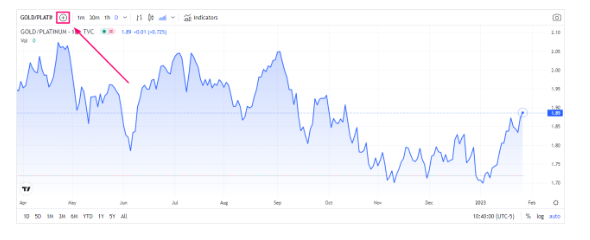
Bullion Exchanges compare tool tracks performance differences between multiple market symbols at the same time. There are many reasons why investors use this tool.
For instance, you can select the XAU (gold spot price) and XPT (platinum spot price) symbols.
Once all symbols are entered, an easy-to-read single chart featuring the results will appear.
If you are interested in comparing the charts between two companies in the same industry, then you are in luck. You can use the comparison tool for both companies and view a snapshot of the chart for those selected businesses.
Note: When adding a symbol to the chart, you will notice that the price will change to percent on the vertical axis. This is the only functional option available when comparing symbols.



How to Use The Compare Chart Tool
The Compare Chart tool allows users to compare the performance of multiple financial instruments on a single chart. To use this tool, follow these steps:
- Navigate to the chart of the financial instrument you want to use as the primary chart.
- Click on the "Compare" button located on the top left corner of the chart.
- In the Compare Chart tool, you can enter the symbols of the financial instruments you want to compare to the primary chart. You can also adjust the time frame, indicators, and other chart settings.
- Once you have added the desired financial instruments and made any necessary adjustments, click on "Apply" to view the comparison on the chart.
- You can also click on the "Add to Compare" button for any financial instrument to add it to the Compare Chart and see how it performs in comparison to the other financial instruments.
- To remove any of the financial instruments from the Compare Chart, click on the "X" next to the symbol of the financial instrument you wish to remove.
- Once you are done, you can always come back to the Compare Chart and add or remove financial instruments as necessary.
Various market symbols are currently listed, which will make it easier to analyze each symbol’s value within your desired timeline. Furthermore, if you want to add a symbol not listed on the price chart, you can even add your own. Just click on the search box and enter the desired symbol.